Shop, stock and
equipment under control

The shop runs without a cashier: members pay in the app, the item is reserved at the club or shipped from another warehouse, and pickup is checked off at the club. Receipts, stock, write-offs, repairs and maintenance — all in one system.

Module Add to any plan

Shop & inventory

One order, end to end

From the in-app shop
to a locker in the club

The member pays in the app, and the system finds the item across your warehouses, moves it to the right club and holds it in the pickup box. Follow a single order — there is no cashier anywhere in the chain.

Highlights

Till, stock and equipment —
no spreadsheets

Shaker 600 ml Pre-order
Abay0Central0Satpaev0
Supplier receipt+40 pcs · due Oct 30

Pre-orders

Out of stock in every warehouse? The order isn’t lost — it becomes a pre-order and waits for the next delivery.
held for72:00
Reservation released

In stock2324

Pay on pickup

Members can pay at the club. The reservation is held for 72 hours, and if the order is never paid, it’s released and the item goes back into stock.

Show in the app

Water 0.5 L

Shaker 600 ml

Towel

Membership gifts Staff sales

Hide from the shop

One checkbox removes an item from the app. It still works for membership gifts and staff sales.

“Unlimited year” membership180 000 ₸
Gift orderShaker 600 ml Held at the Abay Ave club
0 ₸

Membership gifts

Someone buys a membership that comes with a gift — the system creates a 0 ₸ order and reserves the item at the member’s club.

Console · Abay Ave club

Isotonic 0.5 L × 21 400 ₸

To terminal
1 400 ₸ Tap your card Paid · receipt

Selling from the console

The online admin sells to a member in the club remotely: the amount goes to the payment terminal and the receipt is issued automatically.

Protein bar · central warehouse

Supplier receipt+48

Transfer to a club−6

Write-off: expired−2

In stock112

Document-based stock

Every stock change is a document: receipt, transfer, write-off. So any discrepancy can be explained.

ItemBooksCounted

Water 0.5 L2323

Isotonic 0.5 L1412 -2

Protein bar4040

Discrepancy report posted

Stocktakes

A recount compares what’s on the shelf with the books, highlights discrepancies and closes them with a document.

Treadmill #4Abay Ave club · cardio zone
WorkingBrokenIn repairWorking

CauseHeart-rate sensor failed

PartHR sensor · from the parts store

RepairContractor · 18 000 ₸

Equipment repairs

Every machine has a passport and a history. A breakdown becomes a repair ticket with the cause, parts, contractor and cost.

AugSepOct

Treadmillsevery 30 days

Strength stacksevery 90 days

Exercise bikesevery 60 days

Service done

Scheduled maintenance

Rules set how often each type of equipment is serviced, and the log keeps every job done with its date.

Product sales with no cashier at the club
Stock adds up without manual spreadsheets
Repairs and maintenance for every machine

Under the hood of the shop

Catalogue by category

Drinks, food, gear — with prices, photos and units. The in-app shop is built from the catalogue automatically.

Warehouse chain

Each club has its own warehouse with a central one above them. For every warehouse you decide whether it takes part in sales.

Partial reservation

Not enough in stock? Part is reserved right away, the rest ships from other warehouses or waits for a delivery.

Orders on behalf of members

Staff can place an order for a member — say, after a request in chat. Reservation and pickup follow the same path.

Cancellations without loss

A cancelled order releases its reservation and returns items to stock. Every action stays in the order history.

Receipts and payment ledger

Every payment gets a fiscal receipt and lands in the shared ledger alongside memberships and services.

In the app

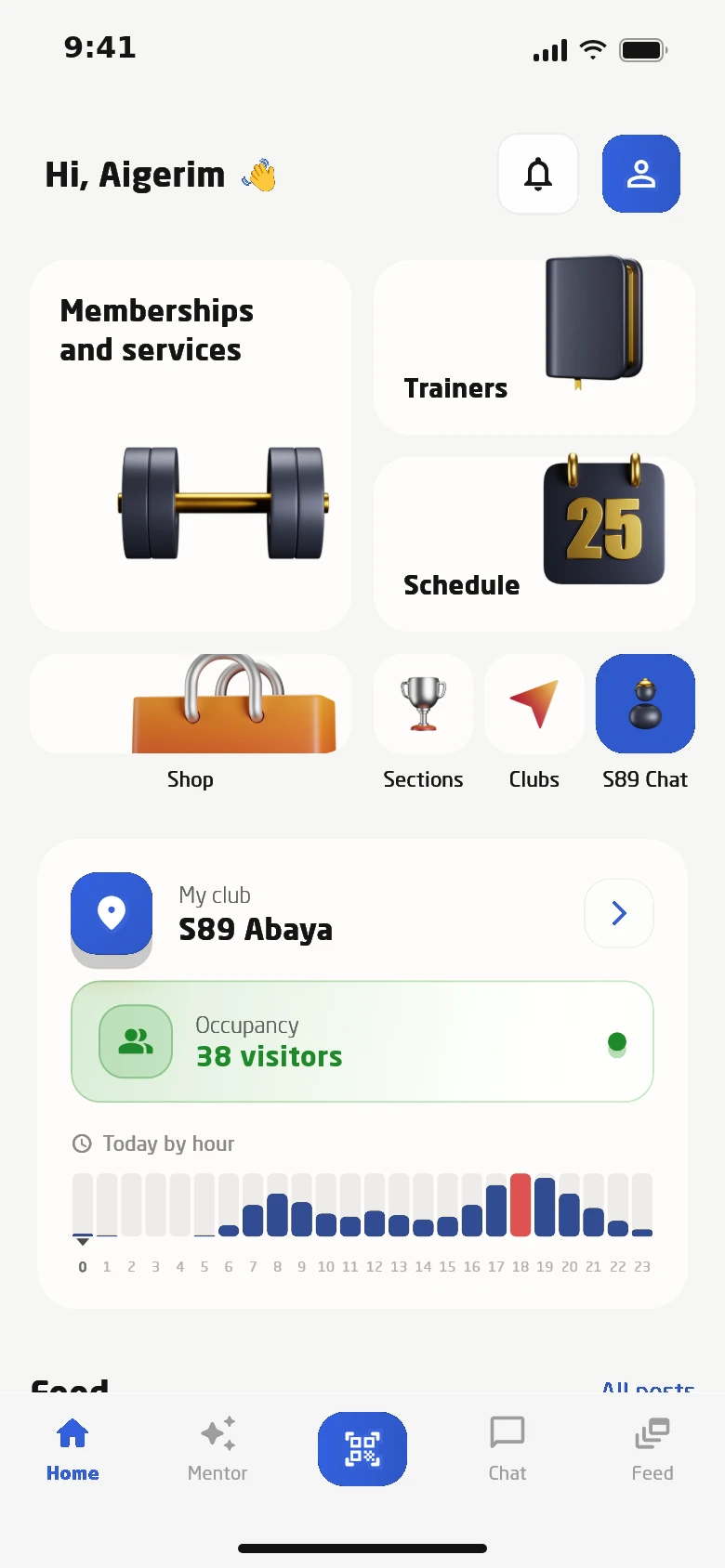
The shop sits in the member’s main menu

The shop tile sits next to memberships and the schedule, so water or a protein bar gets bought on the way to the gym. Members choose the pickup club and pay by card or on pickup.

  • Order status is visible in the app
  • Purchase history in the member profile
  • Products can be sold at any club in the network
  • Hidden items stay off the shop but staff can still sell them
The shop sits in the member’s main menu

Roles

Everyone sees their own part

Rights to warehouse documents are granted separately, so the storekeeper doesn’t touch sales and the online admin doesn’t edit stock. Every action is logged with its author and time.

  • Rights by section and document type
  • Order history with the author of each step
  • The console is all the online admin needs
01 Member Orders and pays in the app
02 Online admin Sells from the console and checks off pickups
03 Storekeeper Receipts, transfers, reference data
04 Accountant Write-offs, stocktakes, suppliers
05 Technician Repairs, maintenance, spare parts
06 Owner Orders, stock and movements across all warehouses

Equipment

A passport for every machine

Each machine in the system has a passport with its model, club, condition and full history. Spare parts are tracked as a separate warehouse, so you can see where the money went.

  • Reference list of failure causes
  • Contractor and cost on every repair
  • The AI assistant collects members’ wishes for new equipment
01 Passport Model, category, club, condition
02 Relocations Moving a machine between clubs, with history
03 Repairs Ticket, cause, progress, parts
04 Spare parts Stock by club, incoming, outgoing, transfers
05 Maintenance log Completed service with dates

Autonomous club

An evening of shop sales with no cashier

  1. Client

    Buys a yearly membership in the app that comes with a free shaker.

  2. System

    Creates a 0 ₸ gift order and reserves the shaker at the member’s club warehouse.

  3. Online admin

    The member asks for an isotonic drink at the club. The admin sells it from the console — the amount goes to the club’s payment terminal and the receipt is sent automatically.

  4. Online admin

    Checks off pickup of the gift and the drink — both are written off stock.

  5. AI assistant

    A member writes that a second bench is missing in the mornings. The assistant confirms the club and passes the wish on to the team.

  6. Owner

    Sees yesterday’s orders and stock by warehouse, while the bench request is already with the team in Telegram.

How to get started

The shop and inventory are up and running in a few steps.

  1. 01

    Reference data

    Set up club warehouses, a central warehouse, categories, units and suppliers.

  2. 02

    Products

    Add items with prices and decide what to show in the app.

  3. 03

    Stock

    Post a supplier receipt — the item appears in the warehouse and in the shop.

  4. 04

    Equipment

    Add machines and maintenance rules — the log shows what was serviced and when.

Also included

  • Warehouses linked to clubs
  • A central warehouse above club warehouses
  • Categories and units of measure
  • Suppliers with contacts and bank details
  • Transfers with receipt confirmation
  • Stock and reservations per warehouse
  • Full movement history for every item
  • 0 ₸ gift orders
  • Order cancellation with return to stock
  • Pay on pickup with automatic release of reservations
  • Moving equipment between clubs
  • Reference list of failure causes
  • Members’ equipment wishes via the AI assistant

Questions about the module

Who hands over items if there’s no cashier at the club?

Club staff or the online admin checks off the pickup remotely. The check-off writes the item off stock.

What if the item isn’t at the member’s club?

The system reserves it at a warehouse higher up the chain or elsewhere in the network and creates the transfer itself. If it’s nowhere in stock, the order becomes a pre-order.

What happens to an order that isn’t paid?

If the member chose to pay on pickup, the reservation is held for 72 hours. If they don’t pay, it’s released automatically and the item goes back into stock.

Can I hide a product from the app?

Yes, with one checkbox. It stays available for membership gifts and staff sales.

How are spare parts tracked?

As a separate warehouse: stock by club, incoming, outgoing for repairs and transfers.

Works together with

See the system on your own club

In 30 minutes we walk through the member journey from buying a membership to entering the club, and quote a price for your club.

  • Demo with your memberships and prices
  • A plan for data migration and launch
  • Training for front desk and trainers
Number of clubs

We will call you back within a business day. You can also message us on WhatsApp or Telegram.

Book a demo